
Most business owners don’t think seriously about what is managed IT until something forces the conversation a server that goes down during business hours, employees who can’t access shared files, a phishing email that reached the wrong inbox, an internet outage during a client presentation that couldn’t have happened at a worse moment.
These situations feel unrelated when they happen. They usually aren’t. In most cases, they share a common cause: technology being managed reactively rather than proactively addressed after problems occur rather than before they do.
Managed IT Services exist to change that dynamic. For small and mid-sized businesses in Glendale, understanding what managed IT actually means not the marketing version, but the operational reality is the starting point for making a decision that will affect how reliably your business runs every day.
The Difference Between Managing Technology and Repairing It

Traditional IT support is transactional. Something breaks, you call someone, they fix it, and you pay for the visit. For simple environments, this works.
Modern business technology is different. Most organizations now run on Microsoft 365, cloud storage, VoIP phones, remote access tools, and cybersecurity systems — all working together, all the time. When one fails, everything connected to it slows down or stops.
The cost of an hour of downtime usually exceeds the cost of preventing the problem. That’s the core argument for managed IT.
From Reactive to Proactive
Managed IT services replace break-fix support with ongoing responsibility. Your provider monitors systems, maintains infrastructure, manages security, supports employees, and guides technology decisions continuously, not just when something breaks.
According to CompTIA’s IT Industry Outlook, organizations that move to managed IT report fewer outages and lower total IT costs within the first year. The difference isn’t better tools. It’s a model that succeeds by preventing problems rather than profiting from them.
What Managed IT Services Actually Mean in Practice
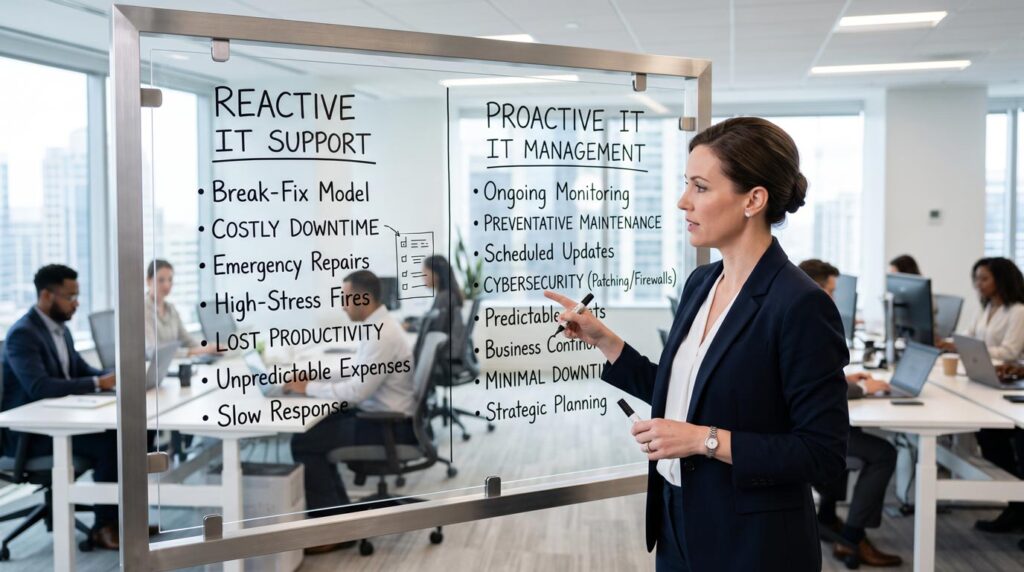
The clearest way to understand managed IT is to compare what changes when a business has it versus when it doesn’t.
Without Managed IT
A slow server gets investigated after employees complain. A security gap gets addressed after it’s exploited. Backups get tested only when someone questions whether they work — usually after they’re actually needed.
With Managed IT
The slow server gets flagged during routine monitoring. The security gap gets patched on schedule. Backups get tested regularly because restoration testing is part of the agreement.
The Underlying Shift
This is what managed IT actually represents not a different set of tools, but a different relationship with technology. Your provider sees your systems every day, not just when something goes wrong. Security runs continuously. Employees get support when they need it. Technology decisions happen with informed guidance.
The specific services monitoring, help desk, cybersecurity, backup, cloud management, network management, and strategic planning deliver that relationship in practice.
For most Glendale businesses, the real comparison isn’t managed IT versus perfect internal IT. It’s managed IT versus the informal approach most small businesses currently use: relying on whoever is most technical on staff, calling a technician when something breaks, and hoping quiet systems aren’t quietly accumulating problems.
For a complete breakdown of each component, see: What’s Included in Managed IT Services
What Managed IT Services Are Not

Managed IT doesn’t mean outsourcing everything. Many businesses keep an internal IT coordinator and use a managed provider for cybersecurity, monitoring, cloud management, and after-hours coverage. Internal knowledge plus external depth often works better than either alone.
What Falls Outside the Scope
Standard managed IT agreements typically exclude new hardware purchases, office relocations, structured cabling, large infrastructure projects, custom software, and website development. These are separate engagements. Knowing the boundary before signing prevents surprises later.
Who Benefits Most From Managed IT Services
Managed IT delivers the clearest value for businesses that depend heavily on technology, handle sensitive data, use cloud applications, support remote employees, or operate across multiple locations.
The Business Profile That Fits Best
Most small and mid-sized companies in Glendale match this profile. Gartner research shows that small businesses using managed IT achieve better security outcomes and lower per-incident costs than those managing IT internally.
Still unsure whether your business has reached that point? Our guide on 5 signs your business needs managed IT services covers the most common indicators.
Why Glendale Businesses Are Moving Toward Managed IT

Three things have changed significantly in recent years. Cloud adoption has accelerated. Cybersecurity threats have grown more frequent and more sophisticated. Remote and hybrid work has become standard rather than occasional.
The Gap Most Businesses Face
Most small businesses can’t justify a full internal IT department. The gap between how much they depend on technology and how structured their IT management actually is that’s where managed services deliver their value.
Weighing the decision between internal IT and a managed provider? Our comparison of in-house IT vs managed IT services covers the trade-offs in detail.
How Techbleed Helps Glendale Businesses
At Techbleed, our managed IT services cover 24/7 monitoring, cybersecurity, help desk support, cloud management, backup and recovery, network management, and strategic planning.
We build solutions around your operational needs not a standard package. If you’re evaluating managed IT for the first time, or questioning whether your current provider delivers real value, a free assessment gives you an honest picture.
Frequently Asked Questions
What is the simplest way to explain managed IT services?
Managed IT services means a provider takes ongoing responsibility for monitoring, maintaining, securing, and supporting your technology environment rather than responding only when something breaks. The focus is prevention and continuity rather than reactive repair.
How is managed IT different from break-fix IT support?
Break-fix support is transactional you pay per incident when something goes wrong. Managed IT is ongoing your provider continuously monitors and maintains your systems with the goal of preventing problems before they affect your business. The cost model shifts from unpredictable emergency expenses to a fixed monthly fee.
What size business benefits most from managed IT services?
Businesses with 10 to 200 employees that depend heavily on technology, handle sensitive data, use cloud applications, or support remote employees typically see the clearest value. Managed IT provides enterprise-level capabilities without the cost of an equivalent internal team.
Is cybersecurity included in managed IT services?
It should be, but not every provider includes comprehensive cybersecurity by default. Look specifically for endpoint protection, patch management, email security, vulnerability monitoring, and multi-factor authentication enforcement not just antivirus software. These components need to work together as a layered defense.
Can a business use managed IT services alongside internal IT staff?
Yes this is increasingly common. Many businesses maintain an internal IT coordinator for organizational familiarity while relying on a managed IT provider for cybersecurity depth, after-hours coverage, cloud management, and specialized expertise. The combination often provides better coverage than either approach alone.
How do I evaluate whether a managed IT provider is actually delivering value?
Look at measurable outcomes: system uptime, response times on support requests, frequency of security incidents, and whether your technology environment is improving over time. A provider delivering genuine managed services should be able to show you monitoring reports, security posture improvements, and technology planning documentation not just a list of tickets closed.


