

What is included in managed IT services? This is one of the most important questions business owners should ask when comparing IT providers. The monthly fee tells only part of the story; the more important issue is what the provider will actually take responsibility for after the agreement begins.
A well-designed plan typically combines day-to-day IT support with the ongoing management of cybersecurity, cloud platforms, business communications, and network infrastructure. It also defines how systems will be monitored, maintained, documented, and improved over time.
There is no universal package that every provider follows. One agreement may include 24/7 help desk access, backup management, and on-site support, while another may price those services separately. Understanding the scope helps you compare providers accurately, identify gaps, and avoid discovering an important exclusion during an outage or security incident.
This guide explains the core service areas commonly found in a comprehensive managed IT services plan, the management responsibilities that connect them, and the questions every business should ask before signing an agreement.
Managed IT Services Are an Operating Model, Not a List of Tools
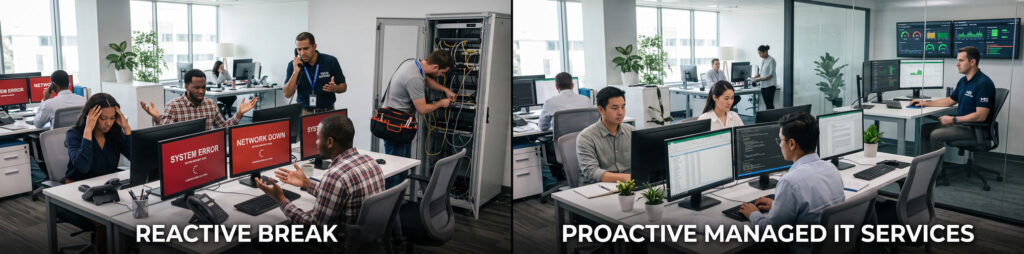
Managed IT services are often described through individual tools: antivirus software, remote monitoring, cloud backup, a ticketing system, or a help desk. Those tools matter, but they do not define the service on their own.
The central difference is ongoing responsibility. A managed service provider does not wait for a business to report every problem. The provider monitors the environment, performs scheduled maintenance, responds to employee requests, manages changes, documents systems, and helps the organization plan future improvements.
This is different from break-fix IT support, where a technician is contacted only after something stops working. A managed relationship creates a continuous process for supporting users and maintaining the wider technology environment.
If you are new to the model, start with What Are Managed IT Services? A Business Owner’s Guide for a broader explanation of how managed IT works.
What Is Included in a Comprehensive Managed IT Services Plan?
A complete plan usually connects several technology areas that businesses might otherwise manage through separate vendors. The exact tools and response conditions depend on the agreement, but the following five service areas form the core of Techbleed’s Managed IT Services architecture.
1. IT Support and Help Desk Services
Employees need a consistent place to request help when they cannot access an account, connect to a system, use an application, or complete their work because of a technical problem.
IT support services may include:
- Help desk access by phone, email, or approved support channels
- Remote troubleshooting for computers, applications, email, and connectivity
- Password resets and user access assistance
- Microsoft 365 and Google Workspace support
- Printer and peripheral troubleshooting
- Employee onboarding and offboarding
- Ticket prioritization, escalation, and documentation
- On-site assistance when physical access is required
The agreement should state when support is available, how urgent requests are prioritized, and when an issue qualifies for on-site service. “24/7 support” should never be treated as a complete service description without defined response and escalation conditions.
2. Managed Cybersecurity
Cybersecurity is part of managing a modern IT environment, but the exact security scope can vary significantly between providers and service plans.
Managed cybersecurity services may include:
- Endpoint protection for workstations, laptops, and servers
- Security patching and vulnerability management
- Multi-factor authentication and identity controls
- Email security and phishing protection
- Firewall and network security management
- Threat alert monitoring and investigation
- Access reviews and security policy support
- Security awareness guidance for employees
- Incident escalation and response coordination
Security should work as a coordinated set of controls rather than a collection of unrelated products. No provider can guarantee that an incident will never occur. A strong managed security program reduces avoidable exposure, improves visibility, and creates a clearer process for responding when suspicious activity appears.
3. Cloud Computing and Platform Management
Cloud platforms still require administration after they have been deployed. User accounts, licenses, permissions, security settings, storage, and integrations all change as a business grows.
Cloud computing management may cover:
- Microsoft 365 or Google Workspace administration
- User, group, and license management
- Identity and access configuration
- Cloud storage and sharing permissions
- Virtual servers or hosted application environments
- Security and configuration reviews
- Cloud migrations and platform changes
- Ongoing troubleshooting and vendor coordination
Cloud management is especially important during employee onboarding and offboarding. New users need the correct access without receiving unnecessary privileges. Departing users need to be removed from every relevant system through a documented process.
4. Unified Communications
Business communication now extends beyond a desk phone. Employees may depend on hosted VoIP, mobile calling, messaging, video meetings, shared contacts, call routing, and integrations with customer or business applications.
Unified communications services may include:
- Business phone systems and hosted VoIP
- Extensions, call queues, forwarding, and voicemail
- Team messaging and video meetings
- Mobile and remote communication access
- User, number, and permission administration
- CRM and supported application integrations
- Communication platform troubleshooting and ongoing changes
Not every managed IT agreement includes the communication platform itself. The agreement should clarify whether the provider manages only technical support, the complete phone and collaboration environment, or coordination with a separate carrier.
5. Network Infrastructure Management
Every cloud service, security tool, communication platform, and employee device depends on a stable network. Ongoing network management focuses on the reliability, security, and performance of that foundation.
Network infrastructure services may include:
- Router, switch, firewall, and wireless access point management
- Business Wi-Fi configuration and performance monitoring
- Internet connectivity troubleshooting
- Secure remote-access configuration
- Network documentation and equipment inventories
- Firmware and configuration management
- Coordination with internet and equipment vendors
- Capacity and upgrade planning
Ongoing network management should be distinguished from one-time infrastructure projects. A new office buildout, structured cabling installation, server-room redesign, or major equipment deployment may be quoted as a separate project even when the resulting network will later be managed under the service agreement.
The Management Layer That Connects Every Service
The five service areas explain what parts of the technology environment may be covered. A managed IT agreement should also explain how those systems will be managed as one connected responsibility.
Continuous Monitoring and Alert Response
Monitoring tools can track the health and availability of supported servers, devices, networks, security systems, storage, and services. Alerts help technicians identify developing issues before employees report a complete failure.
Monitoring does not mean every alert receives the same response. The provider should define which systems are monitored, which events trigger action, and how alerts are prioritized outside normal business hours.
Preventive Maintenance and Patch Management
Managed IT should include scheduled work that keeps supported systems stable and secure. This can involve operating-system updates, application patches, firmware updates, configuration reviews, storage checks, and maintenance of supported devices.
Maintenance schedules should balance security and reliability with the operational needs of the business. Critical changes may require testing, approval, and a planned maintenance window.
Documentation and Asset Visibility
Reliable support depends on accurate information. Providers may document devices, network equipment, cloud platforms, user accounts, warranties, licenses, vendors, configurations, and recovery procedures.
Good documentation reduces dependence on individual memory. It also makes troubleshooting, onboarding, planning, and incident response more consistent.
User and Access Lifecycle Management
Employees join, change roles, move between locations, and leave the organization. Each change can affect devices, email, cloud applications, security groups, phone systems, and access permissions.
A managed process coordinates these changes across the supported environment. It helps new employees become productive sooner and reduces the risk of former employees or inactive accounts retaining unnecessary access.
Vendor Coordination
Technology problems often involve more than one vendor. An internet outage may require coordination with the carrier. A cloud application issue may need escalation to the software provider. Hardware failures may involve a manufacturer or warranty partner.
A managed IT provider can act as the technical point of contact, gather the necessary information, coordinate escalation, and follow the issue through resolution. The agreement should clarify which vendors and systems are covered by this responsibility.
Strategic IT Planning
Managed IT should help a business plan beyond the next support ticket. Strategic guidance may include hardware lifecycle planning, technology roadmaps, security priorities, budgeting, cloud adoption, office expansion, and preparation for changes in staffing or operations.
The depth of this service varies. Some agreements include scheduled technology reviews and budget planning. Others provide strategic consulting separately. Ask what planning activities are included, how often they occur, and who participates.
Are Backup and Disaster Recovery Included?
Backup and disaster recovery are closely connected to managed IT, but businesses should not assume that every plan includes complete recovery coverage.
A provider may manage workstation or server backups as part of the monthly agreement. A more comprehensive business continuity plan may be scoped separately because it also addresses recovery priorities, internet failover, power protection, alternate workflows, and the ability to continue critical operations during a disruption.
Backup and disaster recovery services should define:
- Which systems, applications, and data are protected
- How frequently backups are created
- How long recovery points are retained
- Where backup copies are stored
- How backups are protected from unauthorized changes
- How often restoration is tested
- Who initiates and manages a recovery
- The expected recovery point and recovery time objectives
Cloud file-sync platforms may provide version history and recovery features, but those features alone do not create a complete disaster recovery plan. A business also needs to understand which systems are covered, how operations will be restored, and whether the recovery process has been tested.
What Is Usually Not Included in the Monthly Agreement?
Scope boundaries are normal. What matters is that they are clear before the service begins.
Items often priced separately include:
- New computers, servers, network hardware, and other equipment
- Software licenses, cloud subscriptions, and carrier charges
- Major cloud migrations or infrastructure projects
- Office relocations and new-location buildouts
- Structured cabling and physical installation work
- Custom software, database, or website development
- Large remediation projects identified during onboarding
- Cyber insurance, legal advice, or compliance certification
- Work involving systems or vendors outside the supported environment
Some providers may include limited versions of these services or bundle them into a customized plan. The agreement should explain what is included, what requires approval, and what will generate a separate project estimate.
Fully Managed and Co-Managed IT Have Different Scopes
The right service model depends on the internal resources a business already has.
Fully Managed IT
In a fully managed model, the provider operates as the organization’s primary IT team. The provider may handle employee support, system administration, cybersecurity, cloud platforms, network management, vendor coordination, documentation, and ongoing planning.
This model is often appropriate for small and growing businesses that do not maintain a complete internal IT department.
Co-Managed IT
In a co-managed model, the provider works alongside internal IT staff. The internal team may retain responsibility for business-specific systems or strategic priorities, while the provider adds help desk capacity, after-hours coverage, specialized security expertise, cloud administration, project support, or on-site resources.
A co-managed agreement should define ownership clearly so requests do not fall between the internal team and the provider.
Questions to Ask Before Signing a Managed IT Agreement
Use these questions to compare providers and confirm the real scope of the service:
- Which users, devices, locations, applications, and systems are covered?
- What support channels and service hours are included?
- How are critical, high-priority, and routine issues defined?
- What response and escalation expectations apply to each priority level?
- Which systems are monitored, and what happens when an alert appears?
- Are cybersecurity tools and security monitoring included or priced separately?
- Are backups included, and how often is restoration tested?
- Is on-site support available, and under what conditions?
- Who manages Microsoft 365, Google Workspace, cloud platforms, and user access?
- Are business phone and communication systems part of the agreement?
- Which third-party vendors will the provider coordinate with?
- What documentation, reporting, and strategic planning are included?
- What happens when the business adds employees, locations, or systems?
- Which services, projects, equipment, and licenses are explicitly excluded?
- How are out-of-scope requests approved and priced?
A detailed agreement should make these responsibilities understandable without requiring the business to interpret vague phrases such as “complete IT coverage” or “unlimited support.”
How Techbleed Supports Businesses in Glendale and Greater Los Angeles
Techbleed builds Managed IT Services around the actual users, systems, risks, and operational priorities of each business. Depending on the approved scope, the service plan can coordinate IT support, cybersecurity, cloud platforms, unified communications, network infrastructure, monitoring, maintenance, documentation, vendor management, and technology planning.
Businesses can use Techbleed as a fully outsourced IT team or add technical capacity and specialized expertise to an existing internal team. Remote support is combined with on-site assistance when a device, network, facility, or infrastructure issue requires a local technician.
The objective is not to force every organization into the same package. It is to define clear responsibility for the technology your business depends on and manage that environment through one consistent process.
Contact Techbleed to discuss your current environment and determine which services should be included in your managed IT plan.
Frequently Asked Questions
What is included in managed IT services?
Managed IT services commonly include help desk support, remote troubleshooting, cybersecurity management, cloud administration, unified communications support, network management, monitoring, preventive maintenance, documentation, vendor coordination, and strategic IT planning. Backup, disaster recovery, on-site support, and major projects may be included or priced separately depending on the agreement.
Is cybersecurity included in managed IT services?
Cybersecurity should be addressed in the service scope, but not every provider includes the same tools or responsibilities. Confirm whether endpoint protection, patch management, email security, identity controls, firewall management, threat monitoring, employee guidance, and incident response coordination are included.
Are backup and disaster recovery included?
They may be included, offered as an additional service, or managed under a separate business continuity plan. Ask which systems and data are protected, how often backups run, how long recovery points are retained, how restoration is tested, and who manages recovery during an incident. Cloud file-sync platforms such as OneDrive can provide version history and recovery features, but they do not by themselves replace a documented and tested disaster recovery plan.
Does managed IT include 24/7 support?
Some plans include 24/7 help desk access and continuous monitoring, while others provide after-hours response only for critical incidents. The agreement should distinguish monitoring coverage, help desk availability, response targets, and escalation conditions.
Does managed IT include on-site support?
Many providers combine remote and on-site support. Remote assistance can resolve many software, access, and configuration issues quickly. Hardware, connectivity, facility, and infrastructure problems may require an on-site visit. Availability, service area, response expectations, and additional charges should be confirmed in advance.
How much do managed IT services cost?
Pricing depends on the number of users and devices, the complexity of the environment, support hours, cybersecurity requirements, cloud platforms, backup coverage, on-site needs, and the division of responsibility between the business and the provider. A useful proposal should connect the price to a clearly documented scope.
What is the difference between managed IT services and break-fix support?
Break-fix support begins after a business reports a problem and is usually billed per incident or project. Managed IT services create an ongoing relationship in which the provider supports users, monitors and maintains covered systems, manages changes, documents the environment, and helps prevent recurring problems.


