
Ransomware recovery services get your systems, data and operations back after an attack. How fast that happens depends mostly on what was set up before the attack: isolated backups, a ranked list of systems to restore, and a plan your team has rehearsed. For a small business or law firm in Glendale and the Greater Los Angeles area, the best recovery service is an IT partner who already knows your environment, keeps your backups safe from attackers and has a written plan ready on the day it is needed.
TL;DR
- Recovery means restoring systems, data and operations. It is a different job from prevention (keeping attackers out) and from response (containing the attack).
- The first hours matter: isolate affected systems, preserve evidence, call your IT provider and restore only after the infection is gone.
- Backups that are offline or isolated, and tested regularly, are the single biggest factor in how quickly you recover.
- A recovery plan ranks your systems by how much the business depends on them and names who does what.
- Our backup and disaster recovery and continuity planning work is built so that day is a restore, not a crisis.
Table of Contents
- What ransomware recovery services actually do
- The first hours: what to do after you discover an attack
- How recovery actually proceeds
- Ransomware disaster recovery: the backup rules that decide the outcome
- What a ransomware recovery plan should include
- How to evaluate ransomware recovery support
- Why recovery works best as part of managed IT
- Building your plan with Techbleed
- A practical 30-day starting checklist
- FAQ
- Sources
What ransomware recovery services actually do
Ransomware is malicious software that encrypts your files, or steals them, and then demands payment. Three jobs follow from an attack, and people often blur them together:
- Prevention keeps the attacker out: patching, email filtering, multi-factor authentication, staff training.
- Response stops the damage while it is happening: finding which systems are affected, cutting them off from the network, and working out how the attacker got in.
- Recovery brings the business back: rebuilding servers and workstations, restoring data from clean backups, reconnecting systems in a safe order and confirming everything works.
A recovery service covers that third job. In practice it means working through your systems in priority order, restoring from backups you can trust, rebuilding anything that cannot be trusted and checking that the attacker is not still inside before you reconnect.
The work is slower than most owners expect, because every restored system has to be verified before it goes back on the network. Restoring a file server is the easy part. Getting email, line-of-business software, phones and user accounts back in the right sequence is what takes the time.
The first hours: what to do after you discover an attack
The federal government’s guidance for victims is clear about the opening moves. CISA’s guidance for organizations hit by ransomware tells you to work out which systems are affected and isolate them immediately. If several systems look affected, it advises taking the network offline at the switch level, and isolating the systems critical to daily operations first. It also recommends using out-of-band communication, such as phone calls, so the attackers do not see that you have noticed.
In plain terms, that gives you this order:
- Disconnect, do not shut down. Pull network cables or disable Wi-Fi on affected machines so the infection stops spreading. Do not wipe or reinstall anything yet.
- Move the conversation off your network. Use mobile phones rather than company email or chat, which the attacker may be reading.
- Preserve evidence. Photograph the ransom note and any error messages. Do not delete files.
- Call your IT provider. This is the moment a relationship you already have pays off. Someone who knows your network can tell within minutes what is connected to what.
- Do not decide on payment in a panic. Get the facts about what was encrypted, what was copied and what your backups hold before anything else is decided. Your attorney and your cyber insurance carrier, if you have one, should be part of that conversation.
- Restore only after cleaning. Bringing data back onto a machine that is still infected simply loses it again.
If you are unsure whether you are dealing with ransomware or another kind of intrusion, our guide to the signs your business has been hacked covers what to look for.
How recovery actually proceeds
Once the attack is contained, recovery follows a fairly consistent path. NIST, the federal standards body, publishes detailed guidance for this: its ransomware preparation tips point to its Special Publication 1800-11, which describes recovering operating systems, databases, user files, applications and system configurations, and to SP 800-184, a guide to planning for cyber event recovery.
Step 1: Decide what comes back first
CISA advises restoring in the order set by a predefined list of critical assets: systems that support health and safety, revenue generation or other critical services, plus whatever those systems depend on. That last part catches people out. Your accounting software is useless if the server that holds user logins is still down.
For a law firm, the list usually starts with identity and authentication, the document management system and email, then billing and calendaring. For a clinic or an office with a phone system, voice and scheduling may come first. The point is that the list exists before the attack, not during it.
Step 2: Rebuild a clean foundation
The CISA and MS-ISAC (the Multi-State Information Sharing and Analysis Center) Ransomware Guide recommends keeping regularly updated gold images of critical systems, meaning clean, preconfigured copies you can rebuild from. Rebuilding from a known-good image is faster and safer than trying to scrub an infected machine.
Step 3: Restore data from clean backups
The same guide says to reconnect systems and restore data from offline, encrypted backups in the order of your critical services. It also warns you to avoid re-infecting clean systems. Its example is a new, separate network segment (a VLAN) created for recovery, where only verified clean systems are allowed.
Step 4: Verify, then reconnect
Every restored system should be checked before users get it back: does it open, is the data complete, are the accounts and permissions right, and is there any sign the attacker is still present? Skipping this step is how a second encryption event happens a week later.
What drives how long it takes
No honest provider can promise a fixed number of hours, because the timeline depends on factors you largely control in advance:
- Whether your backups survived the attack.
- How many systems were encrypted, and how much data has to be copied back.
- Whether you have a written priority list and clean images, or are working it out under pressure.
- Whether your internet connection, power and phones are still working while you rebuild.
- Whether the person doing the rebuild already knows your environment.
Ransomware disaster recovery: the backup rules that decide the outcome
Backups are where ransomware recovery is won or lost, because attackers know it. Modern attacks often go after backup systems first, so a backup that sits on the same network as your servers may be encrypted along with them.
CISA’s guidance for small and medium businesses recommends the 3-2-1 backup rule: three copies of important files, on two different types of storage media, with one copy stored off-site, away from the business location. The MS-ISAC guide adds that backups should be offline and encrypted, and tested regularly.
The same CISA page makes two testing points that are easy to act on:
- Test that your team can restore data both fully and partially. Restoring one file is not the same as restoring a server.
- Make sure you can roll back data at least seven days. Ransomware sometimes sits quietly before it activates, and last night’s backup may already contain it.
If your business runs on Microsoft 365, do not assume the vendor’s retention is a backup. We cover that in Microsoft 365 backup: is your business data protected?
Why a backup alone is not a recovery plan
Having copies of your data is not the same as being able to restore your business. A backup tells you nothing about whether you can rebuild the server it came from, whether user accounts will work, whether your phone system will reconnect or how long all of that takes. Recovery readiness is proven by doing the restore, not by seeing a green check mark in a backup dashboard.
What a ransomware recovery plan should include
A recovery plan is a document you can open when the network is down. Ready.gov says an IT disaster recovery plan should be developed together with your business continuity plan, with IT priorities and recovery time objectives (how long each system can be down before the business is seriously hurt) set during a business impact analysis. NIST recommends an incident recovery plan with defined roles and strategies for decision making, exercised regularly, alongside a tested backup and restoration strategy with backups isolated so ransomware cannot readily spread to them.
For a small business, that translates into a short list of things to write down:
| Plan element | What it answers | Example for a 20-person firm |
|---|---|---|
| Roles | Who decides, who restores, who talks to staff and clients? | Owner decides, IT partner restores, office manager handles communication |
| Contact list | Who do you call, and how, if email is down? | Mobile numbers for staff, IT provider, attorney, insurance carrier, printed and stored off the network |
| Priority list | Which systems come back first? | Logins, email, document system, then billing |
| Recovery targets | How long can each system be down? | Email within a day, billing within several days |
| Backup map | Where is each backup, and who can reach it? | Local copy, off-site copy, one isolated copy |
| Restore procedure | What are the steps, in order? | Rebuild from clean image, restore data, verify, reconnect |
| Internal and client communication | What do you say and when? | Draft messages prepared in advance |
| Test schedule | When do you rehearse? | At least once a year, plus after major changes |
The last row is the one most plans lack. A plan that has never been rehearsed is a guess. Walk through a tabletop exercise (a talk-through of a made-up attack) and do at least one real restore to see how long it takes.
How to evaluate ransomware recovery support
Whoever you rely on, whether now or on the worst day of the year, should be able to answer these questions plainly:
- Do they know your environment before an attack? A provider that has already mapped your servers, cloud accounts, phones and network will move faster than one meeting your systems for the first time.
- Who is your point of contact? In a crisis you want one person who knows your business, not a ticket queue.
- How are backups protected? Look for offline or isolated copies, encryption and an off-site copy, in line with the 3-2-1 rule.
- Is restoration tested, and how often? Ask when the last full restore was done and how long it took.
- Is there a written priority list and plan? If recovery order is decided during the attack, time is lost.
- What keeps you running meanwhile? Internet failover and power protection decide whether your people can work while systems are rebuilt.
- Do they cover prevention too? Recovery without closing the door the attacker came through invites a repeat.
Notice that most of these are about work done before the attack. That is why recovery is hard to buy at the last minute and easy to build into an ongoing IT relationship.
Why recovery works best as part of managed IT
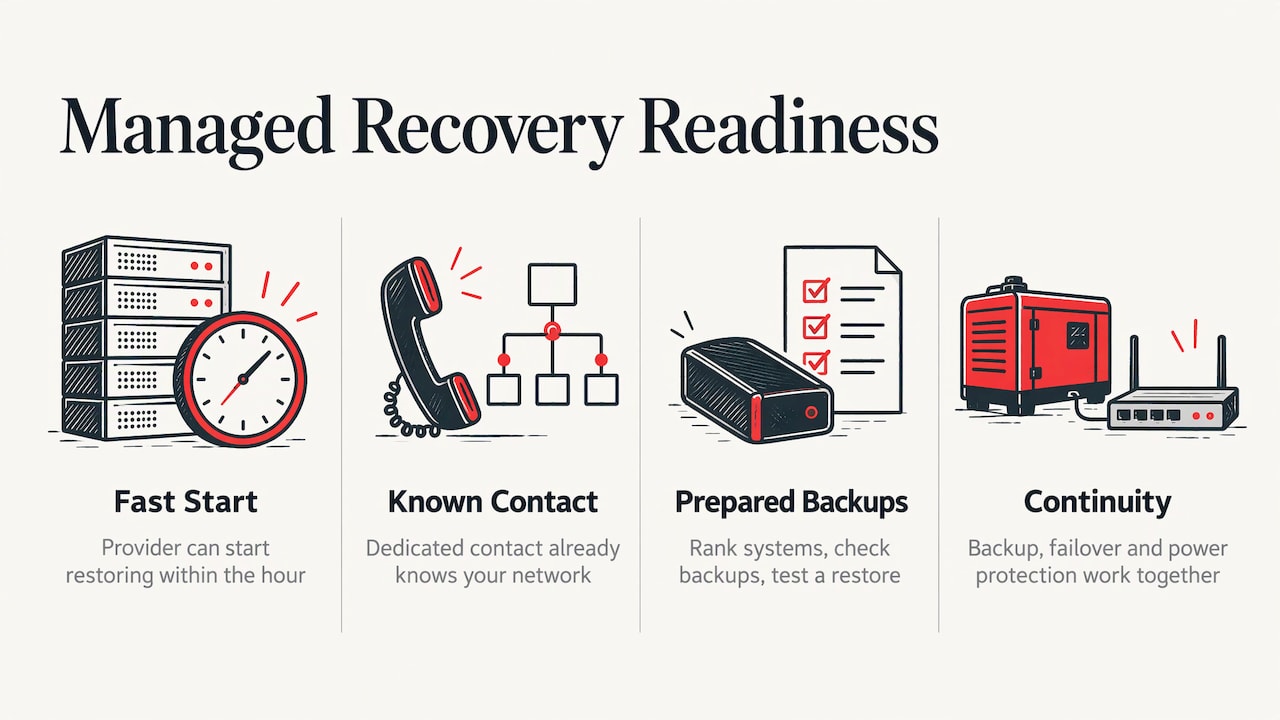
The organizations that recover fastest are rarely the ones that found a specialist after the attack. They are the ones whose IT provider already had the backups, the priority list and the access to start restoring within the hour.
That is how we approach it at Techbleed. We serve small and mid-sized businesses in Glendale and the Greater Los Angeles area through a managed model with a dedicated point of contact, so the person who knows your network is the same person you call. Our business continuity services bring together backup and disaster recovery, continuity planning, internet failover and power protection, the pieces that decide how long you are down.
We tell clients the same thing every time: the ransomware recovery you get is the one you built last quarter. A recovery plan is not paperwork. It is the list of what comes back first, the backup copy an attacker cannot reach, and the person who already knows where everything is.
Our approach is proactive. We would rather spend a few hours with you now ranking your systems, checking your backups and testing a restore than spend a weekend rebuilding from nothing. Continuity planning, backup and disaster recovery, failover and power protection belong together, because an attack is only one of the ways your business can stop. A failed disk, a power cut or a dead internet line stop it just as well, and they are all handled by the same plan.
For law firms and other businesses that hold client confidences, the stakes are higher, and so is the value of having one accountable partner for security and recovery together.
John
Building your plan with Techbleed
If you do not have a tested recovery plan, or you are not sure your backups would survive an attack, the practical first step is a conversation about your actual systems. Our team can review your backup and disaster recovery setup, document your critical systems and recovery order, and fold it into a managed IT agreement with a dedicated point of contact. We back that up with a 92% return client rate.

See how backup and disaster recovery works for Glendale businesses, or contact Techbleed to talk through a recovery plan for your office. Prevention is part of the same picture, and our ransomware protection service covers the front door, while the managed IT plans show how the support fits together.
A practical 30-day starting checklist
You do not need a large project to be in a much better position. In a month, a small office can do the following:
- Week 1: list your critical systems. Write down every system the business needs to operate and what each depends on: logins, internet, phones, line-of-business software.
- Week 1: rank them. Following CISA’s approach, put revenue-critical and client-critical systems first.
- Week 2: map your backups. For each system, find where the copies live. Check that at least one is offline or isolated and one is off-site.
- Week 3: run a restore. Restore a full server or a full mailbox, not a single file, and write down how long it took. Check that you can go back at least seven days.
- Week 4: write the contact sheet and roles. Print it. Include mobile numbers, your IT provider, your attorney and your insurance carrier.
- Ongoing: rehearse yearly and after any major change in your systems.
If phishing is how most attackers get in, training staff to spot it is part of recovery planning too. Our guide to preventing phishing attacks is a good companion to this checklist.
FAQ
How long does ransomware recovery take?
It varies widely because it depends on how many systems were hit, whether your backups survived and whether you have a priority list and clean images ready. A business with isolated, tested backups and a rehearsed plan restores far faster than one improvising. Your own test restores give you the most realistic estimate.
What is the difference between a ransomware recovery plan and a disaster recovery plan?
A disaster recovery plan covers any event that takes systems down, such as fire, hardware failure or power loss. A ransomware recovery plan adds steps specific to an attack: isolating infected systems, confirming the attacker is gone and restoring only into a clean environment. Ready.gov recommends building IT recovery alongside the wider business continuity plan, so one plan can cover both.
Should we pay the ransom?
Do not decide in the first hours. First isolate systems, preserve the ransom note and find out what was encrypted, what was copied and whether your backups are intact. Bring in your IT provider, your attorney and your insurance carrier before any decision is made.
How often should we test our backups?
CISA advises testing that you can restore both fully and partially, and that you can roll back at least seven days. A sensible routine is a scheduled restore test several times a year for critical systems and a full plan rehearsal at least annually, plus a retest after any major change to your servers or cloud setup.
Do small businesses really need this?
Yes. Federal guidance such as CISA’s ransomware materials and its small and medium business backup advice is written for organizations of every size, and a small office with no spare IT staff has the most to gain from a written plan and a partner who knows its systems.
Sources
- CISA: I’ve Been Hit By Ransomware!
- CISA and MS-ISAC Ransomware Guide
- CISA: Back Up Business Data
- NIST: Tips and Tactics for Preparing Your Organization for Ransomware Attacks
- Ready.gov: IT Disaster Recovery Plan
Recommended
- Backup and Disaster Recovery in Glendale, CA
- Phishing and Whaling Attacks: How Businesses Can Prevent Costly Cyber Scams
- Signs Your Business Has Been Hacked
- Business Continuity Services in Glendale, CA
Made with BabyLoveGrowth to get found by Perplexity