
Good nonprofit IT support is a standing relationship with one team that keeps staff devices, email, donor data, backups and security running, and that knows your organization well enough to prevent problems instead of reacting to them. For most small and mid-sized nonprofits that don’t have a full-time IT person, a managed IT partner with a dedicated point of contact is the most dependable way to get there. At Techbleed, we provide that kind of support to small and mid-sized organizations in Glendale and the Greater Los Angeles area.
This guide covers what the support should include, the risks it exists to reduce, how to split work between your staff and an outside team, and how to plan a budget when every dollar is tied to a program.
TL;DR
- Nonprofit IT support should cover the help desk, device and account management, security, backups and recovery, and the systems that hold your donor and grant data.
- Nonprofits are attractive targets: Microsoft’s 2024 report ranks the sector fourth most targeted, and most lack dedicated IT staff.
- Multi-factor authentication, an asset inventory, a written policy and a tested incident plan are the low-cost basics.
- A one-person or part-time IT role is a single point of failure; a managed partner gives you coverage, a documented environment and a named contact.
- Define your needs first, then evaluate providers against them instead of against a sales pitch.
Table of Contents
- What IT support for a nonprofit includes
- Why nonprofits can’t treat IT as an afterthought
- Which IT services to prioritize first
- Security on a small budget: five steps that carry the most weight
- Handling IT with a small team: what to keep and what to hand off
- What to look for in a support arrangement
- Budgeting and funding for nonprofit IT
- How we support organizations like yours
- A simple first-month plan
- Our perspective
- FAQ
- Sources
What IT support for a nonprofit includes
The phrase covers more than “someone who fixes the printer.” A complete arrangement usually has six parts:
- Help desk and on-site support. A person staff can reach when a laptop fails, a password locks someone out or the phones go down. Volunteers and board members who use your systems need this too.
- Device and account management. Knowing which computers, phones and accounts exist, who has access to what, and removing access when someone leaves.
- Cybersecurity. Multi-factor authentication, email protection, endpoint protection, patching and staff awareness training.
- Backup and disaster recovery. Copies of your data stored separately from your main systems, and a plan for restoring them.
- Cloud and collaboration tools. Email, file sharing and video meetings, typically Microsoft 365 or Google Workspace, set up so permissions match who should see what.
- Planning. A short roadmap for replacing aging equipment, adding systems and budgeting for what comes next.
We offer each of these: IT support, cybersecurity, cloud computing including Microsoft 365 and Google Workspace, and business continuity with backup and disaster recovery. A nonprofit does not need all of them on day one, but it should know which are covered and which are not.
Why nonprofits can’t treat IT as an afterthought
Nonprofits hold the same kind of data a business does: donor names and payment details, employee records, and often sensitive information about the people they serve. They usually hold it with fewer people and less budget to protect it.
The CPA Journal describes the pattern in August 2026: nonprofits are viewed as “cyber-poor but target-rich” because they collect valuable data while generally lacking dedicated IT staff or cybersecurity budgets. The same article cites Microsoft’s 2024 Digital Defense Report, which ranks not-for-profits as the fourth most targeted sector by cyber threat actors.
Two more numbers explain why this matters operationally:
- Citing the Association of Certified Fraud Examiners, the same article reports a median fraud loss of $76,000 for nonprofits, and that detection could take up to 24 months.
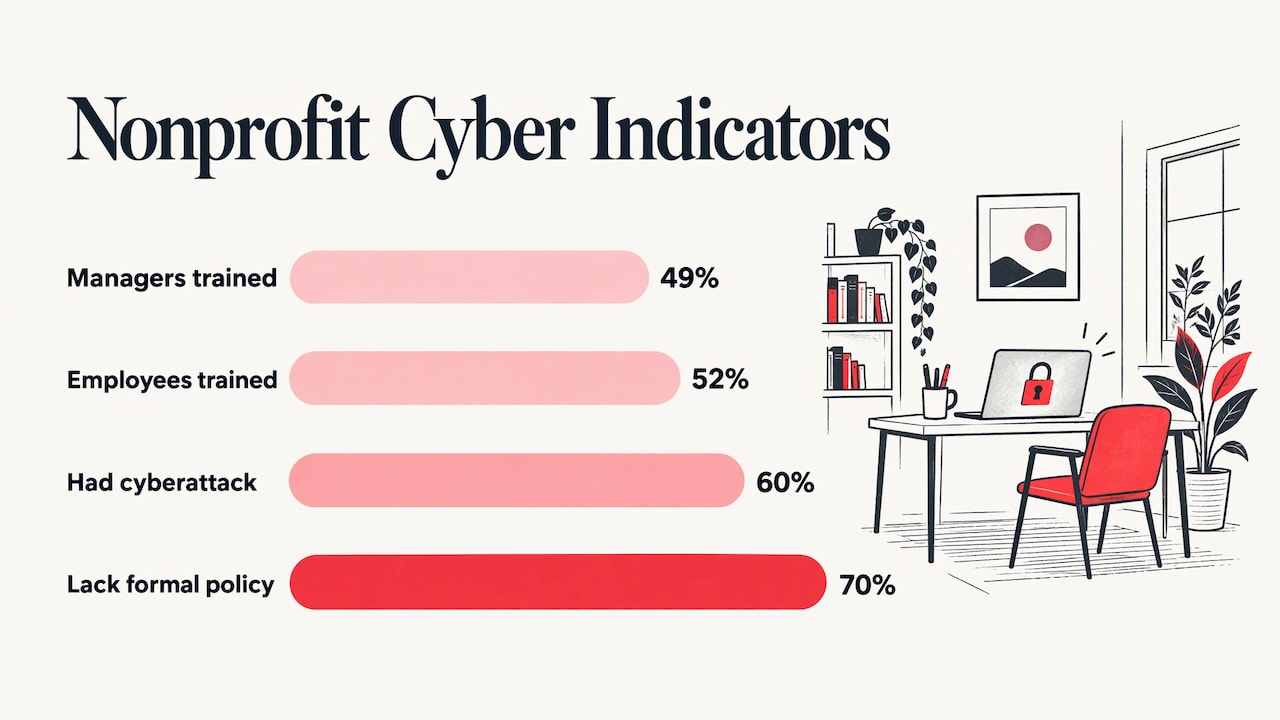
- Nonprofits had the lowest fraud-awareness training rates in that study, roughly 49% of managers and executives and 52% of employees. Organizations that provided training uncovered fraud more than 2.5 times faster than those that did not.
The lesson for IT is that a lot of loss starts with ordinary people and ordinary accounts, not exotic hacking. Staff training, account controls and monitoring do real work.
A 2025 nonprofit cybersecurity roadmap adds that 60% of nonprofits experienced a cyberattack in the past two years, ransomware attacks doubled year over year, 70% lack a formal cybersecurity policy and the average breach costs about $200,000. For an organization running on grants and donations, a loss of that size is a program cut, not a line item.
Which IT services to prioritize first
If you can’t fund everything at once, sequence the work by what would hurt most if it failed.
Start with access, devices and backups
These three protect everything else. Know every device and account, turn on multi-factor authentication (a second check, such as a phone prompt, in addition to a password), and make sure backups exist, are separate from your main systems and have actually been restored in a test. A backup you have never restored is a hope, not a plan.
Then protect the systems that run your mission
Avasant’s survey of more than 300 U.S. and Canadian IT organizations, published in January 2026, notes that nonprofits’ distinctive system needs center on financial applications for grant management, contributions and fund accounting, plus specialized CRM systems for fundraising and donor relationships. Those are the systems where downtime delays a grant report or an appeal, and where a security gap exposes donor records. They deserve the tightest permissions and the most reliable backups.
Last, improve the day-to-day experience
Faster onboarding for new staff and volunteers, a cleaner phone and video setup, and a hybrid-work arrangement that actually works come after the foundation is stable. They matter, but they sit on top of it.
Security on a small budget: five steps that carry the most weight
The 2025 roadmap cited above says even small nonprofits with limited budgets can build strong, inexpensive defenses. Its recommended steps, in the order we would take them:
- Inventory your assets and access. List every computer, phone, server, cloud account and who can reach each. You can’t protect what you can’t list.
- Set device management and data governance rules. Decide which devices may touch donor and client data, how they are encrypted and updated, and how long data is kept.
- Turn on multi-factor authentication. Start with email, finance and donor database logins.
- Write a short security policy. Seven in ten nonprofits don’t have one, so simply having it puts you ahead. One page on passwords, devices, sharing and reporting suspicious messages is enough to start.
- Build an incident response plan and rehearse it. Decide who calls whom, who can shut off accounts and how you notify donors. A tabletop exercise, where the team talks through a made-up incident for an hour, finds the gaps cheaply.
Training belongs alongside these steps. Given the CPA Journal’s finding that trained organizations uncovered fraud much faster, a short recurring awareness session is among the best returns available. Our security awareness training is part of our cybersecurity offering, and our ransomware protection covers the scenario nonprofits fear most.
If your organization handles protected categories of data, such as health or legal client records, ask your attorney or compliance adviser which rules apply to you before you finalize policy. IT support carries those rules out, but the legal reading belongs to counsel.
Handling IT with a small team: what to keep and what to hand off
Most nonprofits start with an “accidental IT person,” an operations manager, a development coordinator or a tech-savvy volunteer who ends up fixing everything. It works until that person is out sick, leaves, or is pulled into a grant deadline.
A workable split looks like this:
| Task | Keep in-house | Hand to a managed partner |
|---|---|---|
| Deciding who gets access to which data | Yes, leadership decides | Partner sets it up and audits it |
| Day-to-day help requests | Staff submit them | Partner resolves them |
| Patching, monitoring, endpoint protection | No | Yes |
| Backups and restore testing | Leadership signs off | Partner runs and tests them |
| Staff security training | Leadership sets expectations | Partner delivers it |
| Software choices tied to programs | Program leads define needs | Partner advises and implements |
| Budget and priorities | Yes | Partner supplies the plan |
The pattern: your team owns decisions about mission and risk, and the partner owns the repeatable technical work that never ends. NTEN’s cloud guide recommends exactly this lens when assessing needs: identify enterprise-wide functions such as email, CRM, case management, communications and project management, note what may expand or contract with demand, and ask what a third party could manage more efficiently.
The case for an outside team is simple arithmetic. One employee is one skill set and one schedule. A managed team brings help desk coverage, security and infrastructure knowledge under one agreement, which matters when you can’t afford to hire for each. Our overview of what managed IT services are and the benefits of outsourcing IT explain the model in more detail.
What to look for in a support arrangement
When you compare options, judge them on how well they fit your documented needs.
- A named point of contact. Someone who knows your setup, so staff don’t re-explain it on every request.
- Proactive work. Monitoring and maintenance that prevent outages, rather than a service that only responds after something breaks.
- Security included in the scope. Not a separate afterthought.
- Recovery you can describe. Ask how long a restore takes and who runs it.
- Clear planning and costs. You should be able to see what is covered per month and what is billed as a project.
- Local reach. If a server fails or a office move happens, someone has to be able to show up.
NTEN’s guidance also warns against letting vendor pitches steer the decision. It recommends documenting what you need first, then evaluating each service against that list, because when two products are nearly identical the choice otherwise turns on preference. The same applies to support providers: bring your list to every conversation.
Budgeting and funding for nonprofit IT
Cost drives technology decisions in this sector more than anything else. NTEN’s 2024 Nonprofit Digital Investments Report found that almost 100% of respondents said cost had significant or some influence on technology investments, and nearly 94% said the same of time to implement. Integration and security also rated high.
That suggests a practical budgeting approach:
- Price the foundation as an operating cost. Support, security and backups are recurring needs, so budget them monthly, not as occasional capital purchases.
- Fold IT into grant requests. The Technology Association of Grantmakers describes funders offering IT assessments, strategic advice, fractional CIO support, tool provisioning and even bundled managed service provider support, standalone or alongside technology funding. If you apply for grants, ask whether technology and support can be written into the request.
- Plan for growth. Avasant’s survey found the government and nonprofit sector leads all sectors in planned IT spending growth, which tells you peers are investing, and that expectations from donors and funders are rising.
We publish three plans, Essentials, Business and Secure, on our managed IT pricing page, so you can see how coverage scales with your needs.
How we support organizations like yours
Techbleed provides managed IT, cybersecurity, cloud, business continuity and communications services to small and mid-sized organizations in Glendale and across Greater Los Angeles. Instead of requiring an in-house IT department, our model gives you a dedicated point of contact and solutions built around how your organization works, with proactive support aimed at keeping systems running and downtime low. Our clients return: 92% of them stay with us.
If you want one team to cover the help desk, security, Microsoft 365 or Google Workspace, backups and planning, start with our managed IT services and tell us what your staff relies on most.
We can also help with network infrastructure, unified communications for phones and video, and internet failover and power protection so a single outage doesn’t stop your programs.
A simple first-month plan
You don’t need a large project to begin. In the first month:
- Week 1: List devices, accounts, software and who administers each one.
- Week 2: Turn on multi-factor authentication for email, finance and donor systems, and confirm backups exist.
- Week 3: Write down your needs by function: email, donor CRM, accounting and grants, communications, project work. Note which ones would hurt most if offline for a day.
- Week 4: Hold a one-hour tabletop exercise on a ransomware or lost-laptop scenario, then decide what to keep in-house and what to hand off.
Bring that output to any provider conversation. It turns a vague request for “IT help” into a scope.
Our perspective
Small organizations tend to treat IT as something they will get to once the budget loosens. In our experience, the better question is who owns it today. When the answer is one stretched person, the organization carries risk it can’t see.
We built Techbleed around the idea that you shouldn’t need an in-house IT department to have dependable technology. A dedicated point of contact who knows your environment, proactive maintenance and security built into the plan mean fewer surprises and less downtime for your staff and volunteers.
Our advice to any nonprofit leader: write down the systems your mission depends on, protect those first, and put recurring support into your operating budget as a standing cost. Then choose a partner who will plan with you, not just answer tickets. That is how we work with the Glendale and Los Angeles organizations that trust us.
John
FAQ
What does nonprofit IT support typically cost?
It depends on the number of users, devices and services covered, and plans are usually billed monthly. We publish our Essentials, Business and Secure plans on our pricing page and can scope a quote around your headcount and the systems you use.
Do we need IT support if we only have a handful of staff?
Yes, because the risk doesn’t shrink with headcount. A small team still holds donor and client data, and a single locked account or failed laptop can stop work for a day. A managed plan gives a small team the coverage of a larger one without a full-time hire.
What is the first security step a nonprofit should take?
Turn on multi-factor authentication for email, finance and donor database accounts, and make an inventory of your devices and who has access. Those two steps are quick and address common ways accounts are compromised. Our cybersecurity services can put the rest in place.
Can a volunteer or board member handle our IT?
They can handle simple requests, but a volunteer isn’t a dependable on-call resource, and knowledge that lives in one person’s head leaves with them. Keep leadership responsible for decisions and hand the recurring technical work, such as patching, monitoring and backups, to a managed team.
How do we know which systems to protect first?
List the systems your programs depend on, such as your donor CRM, accounting and grant tracking, and rank them by how much a day of downtime or a data leak would cost you. Protect the top of that list first with tight access controls and tested backups.
Sources
- Managing Fraud Risks in Not-for-Profits, The CPA Journal
- Your Cybersecurity Roadmap: Protecting Your Mission
- IT Spending, Staffing, and Technology Trends, Avasant
- Cloud Computing for Nonprofits, NTEN
- 2024 Nonprofit Digital Investments Report, NTEN
- Funding Nonprofit Technology, Technology Association of Grantmakers
Recommended
- What Are Managed IT Services?
- 5 Benefits of Outsourcing IT Services for Small Businesses
- How to Choose a Managed IT Service Provider
- What Is Included in Managed IT Services?