
Good IT support for a manufacturer keeps production running first and fixes tickets second. It covers the office network and the plant floor, keeps tested backups and a recovery plan ready, secures every connection between business systems and machines, and gives you one person who knows your site. For a small or mid-sized manufacturer without an in-house IT team, a managed provider with a dedicated point of contact is the practical way to get all of that. That is how we work at Techbleed for businesses in Glendale and Greater Los Angeles.
This guide explains what the support should include, where plants get hurt, what compliance now expects, and how to decide between hiring and outsourcing.
TL;DR
- Manufacturing IT support is judged by uptime on the line. The scope should include networks, endpoints, cloud, backups, security and the links to machines.
- Downtime is expensive. One 2024 survey of 200 US executives put the average estimate at $4.2 million per hour, and cyberattacks were the top cause.
- Connections between office IT and operational technology (OT, the controllers and equipment that run production) should be denied by default and allowed only through monitored paths.
- Defense-adjacent shops face CMMC requirements in contracts that began phasing in on November 10, 2025, so documentation is part of the support job.
- For most small and mid-sized plants, a managed provider with one dedicated contact costs less and covers more than a lone IT hire.
Table of Contents
- What IT support for a manufacturer actually includes
- Why downtime is the number that matters
- Connecting office IT and the plant floor safely
- Backups and continuity for a production environment
- Compliance: what defense and supply-chain work now requires
- What to look for in a support plan
- In-house IT or a managed provider?
- Our perspective
- Talk to a local IT team that plans around production
- FAQ
- Sources
What IT support for a manufacturer actually includes
A manufacturer’s IT footprint is wider than an office’s. The same people who reset passwords also depend on the systems that schedule jobs, track inventory, run quoting and connect to machines. A solid support scope has these parts:
- Help desk and on-site support. Staff in the office, on the floor and at the shipping dock need fast answers, and some problems (a dead switch in a cabinet, a label printer that will not connect) need someone physically there.
- Network and wireless design. Production sites have dust, heat, metal and long cable runs. Coverage, switching and cabling need to be planned around the building, not copied from an office.
- Endpoint and server management. Patching, monitoring and replacement cycles for workstations, shop-floor terminals and servers, so aging hardware does not fail at the worst time.
- Cloud and collaboration. Email, file sharing and virtual desktops through platforms such as Microsoft 365 and Google Workspace, set up so drawings and customer files stay controlled.
- Cybersecurity. Endpoint protection, email filtering, multi-factor authentication, staff training and a ransomware plan.
- Backup, disaster recovery and continuity. Copies of data and configurations, a tested restore process, and a plan for power and internet outages.
- Planning. Budgeting, hardware lifecycles and a roadmap, so IT spend is not a series of emergencies.
We deliver these as managed IT services, with IT support, cybersecurity, network infrastructure and business continuity under one relationship. If the term is new to you, our explainer on what managed IT services are covers the model.
Why downtime is the number that matters
In an office, an outage is an annoyance. On a production line it is lost output, missed shipments and idle labor. The Copia Automation and Sapio Research State of Industrial DevOps report, which surveyed 200 US executives, found an average estimated downtime cost of $4.2 million per hour. Sixty-seven percent said an hour costs $1 million or more. Those are large-plant figures, and a small shop will see a lower number, but the pattern holds: an hour of stopped production costs far more than an hour of IT labor.
The same report found that 47% of unintended downtime was caused by a cybersecurity breach, the most common cause, and that recovering fully from a downtime event took 31 hours on average. Two lessons follow for a smaller manufacturer:
- Prevention beats response. Patching, monitoring and replacing failing hardware before it breaks are cheaper than any emergency call.
- Recovery speed is designed in advance. A plant that has tested restores and a written plan recovers in a fraction of the time of one that starts from scratch.
This is why proactive support, not a phone number you call when something breaks, is the right model for a plant. Our approach is built around problem prevention, hands-on support and planning, with one dedicated contact who knows your environment.
Connecting office IT and the plant floor safely
Most manufacturers run two worlds: IT (email, accounting, ERP, file servers) and OT (PLCs, CNC controllers, sensors, HMIs). Historically OT sat isolated. Now it is connected for remote monitoring, vendor support, quality data and scheduling, and each connection is a path an attacker can use.
The US Cybersecurity and Infrastructure Security Agency (CISA) sets out Cybersecurity Performance Goals that recommend denying all connections to the OT network by default. Where IT and OT must communicate, the traffic should pass through a closely monitored intermediary such as a properly configured firewall, bastion host, jump box or demilitarized zone (DMZ, a buffer network between the two). That intermediary should log activity and allow only approved assets.
In practice, that means four jobs for your IT support:
- Know what is connected. CISA’s OT asset inventory guidance calls an organized, regularly updated list of OT systems, hardware and software foundational. You cannot protect a device nobody has written down.
- Separate business and production networks. Segmentation keeps an infected office laptop from reaching a controller.
- Control remote access. Vendors and staff connecting from outside should use managed, authenticated paths. Our guide to secure remote access for business networks walks through the basics.
- Look for devices nobody labeled as OT. Writing in Advanced Manufacturing in November 2026, a Dragos industrial consultant recommended walking the floor with plant and IT leads and asking of every connected device whether it counts as operational technology. His examples were cellular modems in control cabinets, machine vision cameras and label printers. Anything that qualifies gets the same segmentation, access control and monitoring as a controller.
That floor walk is the kind of exercise that works best when the plant manager and the person responsible for IT sit in the same conversation. A dedicated point of contact makes that possible, because the person who joins the walk already knows your network.
Backups and continuity for a production environment
For a manufacturer, “backup” means more than office files. CISA’s performance goals say systems necessary for operations should be backed up regularly, stored separately from the source systems and tested at least annually. For OT, backups should include configurations, roles, PLC logic, engineering drawings and tools. Incident response plans should be drilled at least annually.
NIST, the federal standards agency, also lists an OT Backup Quick Start Guide (SP 1339), finalized June 17, 2026, among its operational technology publications.
A continuity plan for a plant should answer plain questions:
| Question | What a good answer looks like |
|---|---|
| What stops production first if it fails? | A ranked list of systems, with an owner for each |
| How do we restore, and how long does it take? | A written, tested procedure, not an assumption |
| What if the internet goes down? | A secondary connection that takes over automatically |
| What if power drops? | Protected power for servers, network gear and critical terminals |
| Who is called, and in what order? | One current contact list that the whole team has seen |
We cover backup and disaster recovery, continuity planning, internet failover and power protection as part of our business continuity services. Planning for ransomware deserves its own attention, and our piece on ransomware recovery explains what to prepare.
Compliance: what defense and supply-chain work now requires
If you sell parts to defense primes or federal agencies, or your customers do, your IT support has a documentation job as well as a technical one.
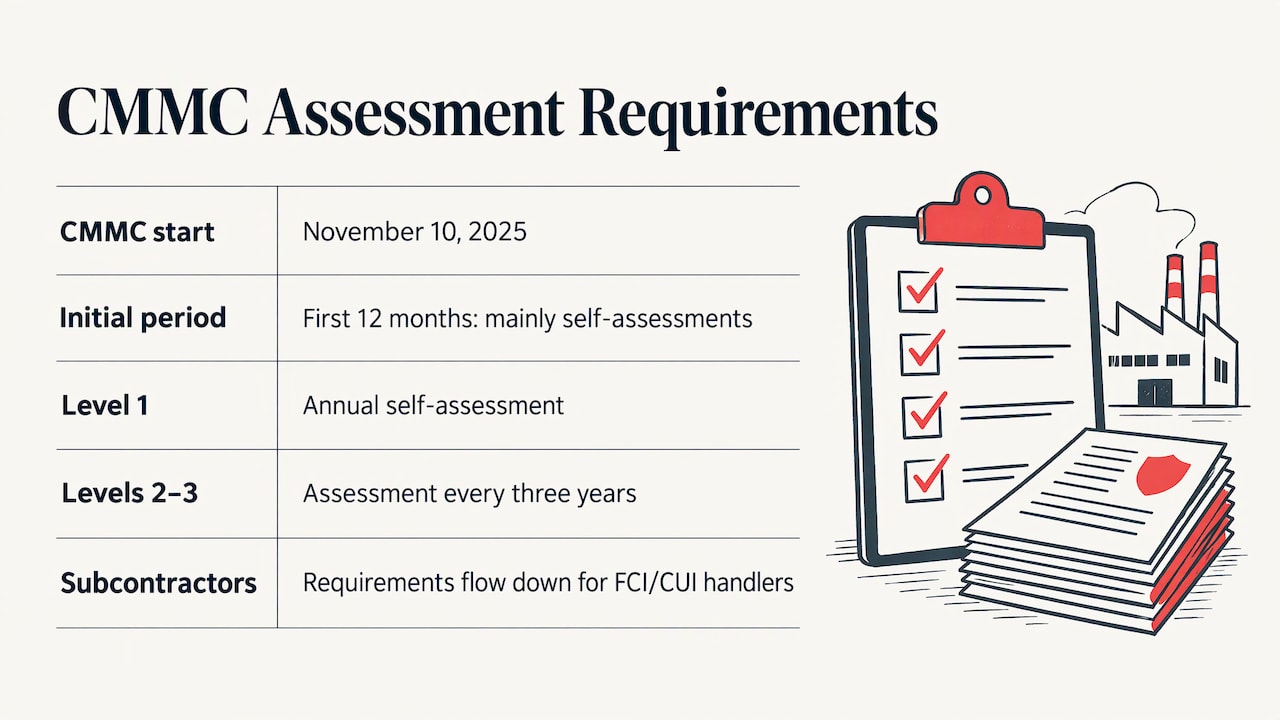
The Cybersecurity Maturity Model Certification (CMMC) program is the Department of Defense’s way of verifying that contractors protect sensitive information. According to the DoD’s CMMC FAQ, the department began including CMMC assessment requirements in applicable procurements on November 10, 2025, when revised DFARS clause 252.204-7021 took effect. The first 12 months focus primarily on self-assessments. Level 1 self-assessments are annual, Levels 2 and 3 assessments come every three years, and the requirements flow down to subcontractors that handle federal contract information (FCI) or controlled unclassified information (CUI).
A practical point from Manufacturing Connected’s CMMC primer: export-controlled markings and distribution statements on your drawings may indicate CUI. If you see them, ask which level your contracts require.
The underlying standard is changing too. A federal regulatory agenda entry lists a final-rule-stage CMMC amendment covering the move from NIST SP 800-171 Revision 2 to Revision 3. NIST also lists SP 1800-10, Cybersecurity for the Manufacturing Sector, finalized in March 2022, and SP 800-82 Rev. 3, its guide to OT security, finalized in September 2023.
These schedules shift, so confirm your own contract requirements with your prime contractor and check the official sources before a deadline. What your IT support should do continuously is the unglamorous part: keep an accurate asset inventory, document access controls, log changes and keep evidence organized. Plants that do it all year are not scrambling when a customer asks.
What to look for in a support plan
When you compare plans, look past the sales language to how the agreement handles production reality. Ask each provider:
- What is covered on site? Remote fixes cover many problems, but cabling, switches and floor-level devices need hands. Confirm when someone can be at your door.
- How are response and resolution defined? Separate the time to acknowledge, the time to begin work and the time to resolve, and find out how urgency is ranked. A line-down issue should not wait in the same queue as a printer request.
- Who do you talk to? A named person who knows your plant beats a rotating queue. Explain your shift pattern and weekend work and see how they plan around it.
- Does the scope include security and continuity? A plan that covers only the help desk leaves the two largest risks to a separate contract.
- How are projects handled? Network upgrades, new lines and office moves should come with a plan and a written scope.
- What does reporting look like? You should see what was patched, what failed and what is coming due for replacement.
- Is pricing tied to a clear plan? Our managed IT plans come in Essentials, Business and Secure tiers, so you can match the level of coverage to the size of your operation.
An agreement that answers these in writing is easier to hold a provider to, and easier for your team to use.
In-house IT or a managed provider?
The honest question for a plant with 20 to 200 employees is whether one hire can cover everything above. A single IT employee covers one shift, takes vacations, gets sick and cannot be an expert in networking, security, cloud, backup and compliance at once. When that person leaves, institutional knowledge leaves with them.
A managed model spreads those skills across a team while your side keeps a single relationship. It also turns IT spending into a monthly line item you can budget, with projects scoped separately. To decide, assess:
- Downtime exposure. How much does an hour of stopped production cost you? If it is more than a month of support, prevention pays for itself quickly.
- Security obligations. Do contracts or customers require documented controls?
- Headcount and coverage. Can one person cover all shifts, and what happens when they are out?
- Growth plans. New lines, a second site or more connected equipment add complexity faster than a single hire can absorb.
- Current visibility. Can you list your devices, your backups and your admin accounts today? If not, outside help should begin with an assessment.
For most small and mid-sized manufacturers in the Los Angeles area, the managed route gives broader coverage with a single accountable contact. Many of our clients stay, and we report a 92% return client rate.
Our perspective
Manufacturers tell us the same thing in different words: they do not want to think about IT until it threatens the schedule. We would rather they never have to.
That is why we build support around prevention. A dedicated point of contact who knows your building, your systems and your priorities catches the failing switch, the unpatched server and the untested backup before they become a stopped line. Cybersecurity and business continuity belong in the same conversation as the help desk, because they are the same risk seen from different angles.
You should not need an in-house IT department to have this. You need a team that plans with you, explains in plain terms and treats your downtime as its own problem. That is the model we offer to small and mid-sized businesses across Glendale and Greater Los Angeles.
John
Talk to a local IT team that plans around production
Techbleed provides managed IT services, cybersecurity, cloud computing, network infrastructure and business continuity to small and mid-sized businesses in Glendale and the Greater Los Angeles area. Each client gets a dedicated point of contact and a support plan built around how the business operates. Start with our managed IT services, or review the Essentials, Business and Secure plans to see which fits your plant.
If you are adding equipment or reworking your network, our IT infrastructure solutions cover design and setup, so new lines connect to a network that was planned for them.
FAQ
What does manufacturing IT support cost?
Costs depend on headcount, number of sites, the equipment you run and how much security and continuity work is included. Our plans are Essentials, Business and Secure, and we scope pricing to your environment, so the quickest way to a real figure is to describe your plant to us. Compare that monthly cost to what an hour of stopped production costs you.
Do small manufacturers need to worry about cyberattacks?
Yes. In the 2024 Copia and Sapio survey, cybersecurity breaches were the leading cause of unintended downtime, at 47%. Attackers care about whether a business will pay to restart, not its size. Multi-factor authentication, patching, staff training and tested backups are the core protections.
Is IT support the same as OT support?
No. IT covers business systems such as email, accounting and file storage. OT covers the equipment that runs production. They now share networks, so IT support must understand how the two connect and keep that connection controlled, following guidance such as CISA’s performance goals. Equipment vendors usually still handle machine programming and repair.
Do I need CMMC compliance?
You need it if you handle federal contract information or controlled unclassified information as a defense contractor or subcontractor. The DoD’s CMMC FAQ says requirements flow down to subcontractors. Check your contracts and ask your prime contractor which level applies to you.
Can a managed provider support a plant with weekend or multiple shifts?
It depends on the agreement, so define coverage hours and escalation in writing before you sign. Tell your provider about every shift and which systems are line-critical. A dedicated contact who knows your schedule makes those arrangements easier to plan and keep.
Sources
- Cybersecurity Performance Goals (CPGs), CISA
- Foundations for OT Cybersecurity: Asset Inventory Guidance, CISA
- Operational Technology Security publications, NIST CSRC
- Devices Security Doesn’t Know Are Operational Technology, Advanced Manufacturing
- State of Industrial DevOps Report, Copia Automation and Sapio Research
- CMMC Program FAQs
- CMMC 101: How to Prepare Your Shop, Manufacturing Connected
- CMMC Program rule entry RIN 0790-AM01, reginfo.gov