
IT support for law firms helps attorneys and staff keep their devices, accounts, documents, and business applications working throughout the day. For a practice in Los Angeles, the priorities may include accessing files before a meeting, resolving a login problem during deadline-sensitive work, and giving employees a clear place to request help.
Effective support starts with understanding how the firm operates: which systems employees depend on, who can approve access changes, and how urgent problems should be escalated.
Techbleed provides IT Support for businesses in Glendale and the greater Los Angeles area, including remote troubleshooting, employee assistance, and on-site support when physical access is needed. For a law firm, the support scope should reflect its applications, working arrangements, and operational priorities.
What Should IT Support for Law Firms Cover?
A useful support agreement connects technical responsibilities to the work employees need to complete. Before selecting a provider, identify the devices, accounts, applications, and locations that require assistance.
The scope should address:
- Computers, operating systems, printers, and scanners
- Email, calendars, and collaboration tools
- Document access, sharing, and synchronization
- Connectivity and approved remote-access tools
- Employee account setup and access changes
- Troubleshooting for supported business applications
- Escalation to software, internet, and equipment vendors
A provider should also explain its limitations. Troubleshooting access to a legal application does not necessarily include configuring every feature, repairing its underlying software, or replacing the application vendor’s support team.
Prioritize Support Around Deadlines and Operational Impact
A printer issue affecting a routine task and a document-access failure affecting an imminent submission need different responses.
The firm and its provider should agree on how employees report urgency. A useful support request identifies the affected system, the number of people involved, the work being blocked, and any relevant deadline.
The support process should define:
- How employees submit urgent and routine requests
- Which issues receive priority
- Who can approve temporary workarounds
- When a problem moves to a specialist or vendor
- How staff receive progress updates
Support hours, response targets, and after-hours arrangements should be documented in the agreement. A response target describes when assistance begins; it should not be confused with a guaranteed resolution time.
Keep Documents Available to Authorized Employees

Document availability involves more than storing files in one place. Employees also need the correct permissions, working applications, and a clear process for resolving access problems.
Consider an attorney who can open a document in the office but cannot access it from an approved laptop elsewhere. The cause could involve account permissions, synchronization, device settings, or the application itself. Support should investigate the cause before creating another copy or broadening access.
A document-support review should establish:
- Which system holds the working version of each document
- How employees share files internally and externally
- Who approves access to restricted folders or workspaces
- How version conflicts and synchronization problems are handled
- Who investigates missing files or accidental changes
The firm should define its document-access and retention requirements. The IT provider can then help implement the corresponding technical settings within the agreed scope.
Connect Secure Access With Client Confidentiality
Convenient access should be considered alongside the sensitivity of the information employees handle. Shared accounts, unnecessary permissions, and forgotten access after an employee leaves should be reviewed as part of the firm’s security arrangements.
CISA’s Secure Our World guidance explains multifactor authentication as using more than a password to access an account. It is one practical consideration when reviewing email, remote access, and other important systems.
The broader access review should consider:
- Individual employee accounts
- Multifactor authentication where supported
- Permissions based on approved responsibilities
- Device protection and software updates
- Secure methods for sharing documents
- Procedures for reporting suspicious messages or activity
Techbleed’s Cybersecurity services address security and access-control needs across accounts, devices, networks, and employee practices.
Technical controls can support the firm’s confidentiality processes. They do not, by themselves, establish compliance with every professional, contractual, or legal obligation. The firm should determine applicable requirements with its legal or compliance advisers.
Make Employee Onboarding and Offboarding Consistent
A new employee should not have to borrow someone else’s account to begin work. Similarly, access removal should follow a defined process when a person leaves or changes responsibilities.
An onboarding checklist can identify the required device, email account, applications, shared resources, and access approvals. It should also tell the employee how to contact support.
Offboarding should address account access, active sessions, equipment return, and approved transfer of business information. Decisions about retaining or deleting information should follow the firm’s instructions.
Clear responsibilities help prevent account changes from being overlooked between the office manager, IT provider, and application vendors.
Plan for Outages and Recovery
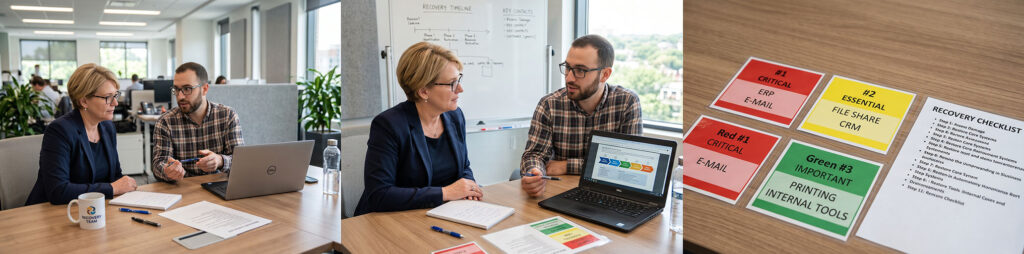
A backup is one part of preparation. The firm also needs to know which systems should be restored first, who coordinates recovery, and how employees will communicate while normal tools are unavailable.
Start by asking:
- Which documents and applications are essential to current work?
- How long could the firm operate without each system?
- How much recent work could it tolerate losing?
- Who authorizes recovery actions?
- How are recovery procedures tested?
- What alternative communication methods are available?
For example, restoring files may not restore productive work if employees still cannot sign in or reach the application that opens them. Recovery planning should consider those dependencies.
Techbleed’s Business Continuity services connect recovery planning with operational needs, including backup and recovery, internet interruptions, and power-related disruptions. The objective is to prepare for disruption and reduce its impact.
Give Vendor Coordination a Clear Owner
A technical problem can involve several providers. The internet connection may work while a cloud application remains unavailable, or a scanner may function locally while failing to send documents to the intended system.
The support agreement should identify who gathers diagnostic information, opens vendor cases, follows up, and updates employees.
For a law firm, this may involve coordinating with:
- Document or practice-management software providers
- Email and cloud-platform providers
- Internet and telephone companies
- Printer and scanner vendors
- Hardware manufacturers
The IT provider should document what it controls and where another vendor must act. This gives the firm a clearer escalation path without implying that one provider can resolve every third-party outage.
When a Law Firm Needs Managed IT Services
IT support focuses on helping employees resolve technical problems. Some firms also need a provider to take continuing responsibility for the wider technology environment.
That broader need may include maintaining devices, administering cloud systems, monitoring infrastructure, coordinating cybersecurity, reviewing backups, and planning equipment replacement.
Techbleed’s Managed IT Services in Glendale provide a framework for ongoing management across agreed systems and services. For a law firm, the agreement should identify which responsibilities are included, which remain internal, and which belong to specialist vendors.
This model may be appropriate when recurring problems span several systems or when nobody has clear responsibility for maintaining the environment between support requests.
Choosing Support for a Firm in Glendale or Los Angeles
Location matters when an issue requires hands-on assistance. A firm evaluating providers should confirm whether its office is covered, how on-site visits are arranged, and which services can be delivered remotely.
Techbleed is based in Glendale and serves businesses across the greater Los Angeles area. The appropriate support arrangement depends on the firm’s location, users, applications, and need for physical access to equipment.
Before choosing a provider, ask:
- Which devices and applications are covered?
- How are deadline-sensitive problems prioritized?
- What support hours and escalation arrangements apply?
- Who approves and implements access changes?
- Who coordinates application vendors?
- Which ongoing management responsibilities are included?
- What requires separate project work or additional payment?
The answers should be specific enough for the firm to understand how support will work before an urgent problem occurs.
Plan IT Support Around Your Firm’s Daily Work
Reliable working practices begin with clear responsibilities: employees know where to request help, access changes follow an approval process, and urgent issues have an escalation path.
IT support for law firms should connect those responsibilities to document availability, employee needs, client confidentiality, and preparation for disruption.
Techbleed can help your firm review its support requirements and define an appropriate service scope.
Frequently Asked Questions
What does IT support for law firms include?
The scope may include employee assistance, device troubleshooting, email and application access, account administration, connectivity, and vendor coordination. The agreement should identify the supported systems, service hours, and exclusions.
Can an IT provider support our existing legal software?
Support depends on the application and agreement. A provider may troubleshoot devices, connectivity, permissions, and access while coordinating application-specific issues with the software vendor. Confirm coverage for each important platform before onboarding.
How does IT support help with client confidentiality?
An IT provider can help implement approved permissions, account controls, device protection, and secure sharing methods. These measures support the firm’s processes but do not guarantee confidentiality or establish legal compliance on their own.
What is the difference between IT support and managed IT services?
IT support handles employee requests and technical problems. Managed IT services extend into continuing responsibility for agreed systems, maintenance, monitoring, security coordination, and planning. Support can be included within that broader agreement.
Can a law firm combine remote and on-site support?
Yes, a support arrangement can include both. Remote assistance may address account, software, and configuration issues, while equipment failures or physical installation work may require an on-site visit. Confirm location coverage and scheduling terms with the provider.


