
Cybersecurity matters for small businesses because daily work depends on accounts, devices, applications, and data that employees need to access safely. A compromised email account, a lost laptop, or an unavailable business application can interrupt work and require time to investigate and recover.
The practical question is not whether a business can eliminate every threat. It is whether the people responsible for its systems know what needs protection, which risks deserve attention first, and what to do when something goes wrong.
This guide explains how cybersecurity connects to business operations and where a small business can begin.
Cybersecurity Is a Business Responsibility
Cybersecurity includes the people, processes, and technical controls used to manage risks to a company’s systems and information. It involves more than installing antivirus software or buying a firewall.
A business needs to understand which systems support its work, who has access to them, how those systems are maintained, and who responds to a suspected incident.
The NIST Cybersecurity Framework 2.0 Small Business Quick-Start Guide offers smaller organizations a starting point for managing cybersecurity risk. Its approach connects decisions about responsibility and priorities with protection, detection, response, and recovery.
A small business does not need to complete every possible security project at once. It does need a way to decide what matters most in its own environment.
Where Can a Security Problem Affect Daily Work?
The effects depend on the system involved and how the business uses it. Consider these common situations:
- Account access: Someone gains access to an employee’s email or cloud account.
- Information exposure: A file is shared with people who should not have access.
- Work interruption: Employees cannot reach an application or device they need.
- Payment risk: A fraudulent message causes staff to question whether payment instructions are genuine.
- Recovery work: The business must investigate an event, restore access, and confirm that its systems are safe to use.
These are examples of possible operational effects, not predictions that every incident will cause the same loss. Mapping systems to actual business work makes it easier to set security priorities.
Know What the Business Depends On
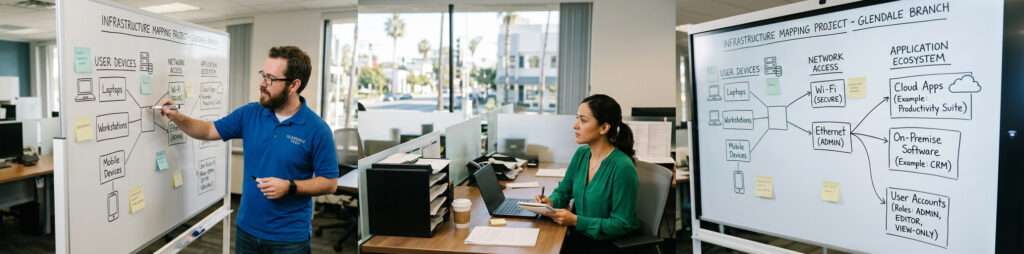
Start with an inventory of the technology employees use. This may include computers, mobile devices, email, cloud storage, financial software, customer records, network equipment, and applications managed by outside vendors.
For each important system, identify:
- Who owns the account and administrative access?
- Which employees need access?
- What business activity depends on it?
- Who maintains its settings and updates?
- Where is essential information stored?
- What would employees do if it became unavailable?
The answers often reveal gaps that a security product alone cannot fix, such as former employees retaining access or a critical application with no clear owner.
Protect Accounts, Devices, and Information
Basic controls should match the way the business works. A practical starting point includes individual employee accounts, appropriate permissions, supported software, device protection, and a process for reviewing access when roles change.
Multifactor authentication adds another step when someone signs in. It is especially relevant to email, administrative accounts, and other important services. The Cybersecurity and Infrastructure Security Agency’s small business guidance also covers recognizing phishing, using strong passwords, turning on multifactor authentication, and updating software.
These measures reduce exposure, but they require ongoing attention. A control that was configured once may need to change when the business adds employees, applications, devices, or locations.
Give Employees a Clear Way to Report Concerns
Employees should know what to do when they receive a suspicious request, lose a device, or notice unusual account activity. Reporting should be simple enough that people use it promptly.
A useful process tells employees:
- Which channel to use for a suspected security issue
- What information to provide
- Who reviews the report
- When an account or device may need to be restricted
- How the business will communicate during an investigation
Training should focus on situations employees may encounter in their own work. It should also make clear that a report is useful even when the employee is uncertain whether an incident has occurred.
Prepare to Respond and Recover
Some problems will still occur despite preventive measures. The business should decide in advance who can investigate, make technical changes, contact vendors, and communicate with affected employees.
Recovery planning should identify essential information and applications, available backups, and the order in which systems would need to return. A completed backup job does not by itself show that employees can resume work. Access, application dependencies, and restoration procedures also matter.
Documenting and testing these responsibilities helps a business find gaps before it depends on the plan.
When Does a Business Need Cybersecurity Services?
A business may need specialist help when it cannot identify who manages access, maintain security controls across its systems, investigate alerts, or prepare a practical response process.
Techbleed’s Cybersecurity services address risks across accounts, devices, networks, employee practices, and access controls. The appropriate scope should be based on the business’s systems and responsibilities.
If security work also needs to be coordinated continuously with employee support, cloud administration, device maintenance, and other IT operations, Managed IT Services in Glendale can provide a broader ongoing management arrangement. The agreement should state which security and IT responsibilities are included.
Neither arrangement guarantees that an incident will never happen or automatically establishes compliance with requirements that apply to a particular business.
Start With Clear Priorities
Cybersecurity matters because business operations depend on people using technology and information every day. The most useful first step is to identify the systems the business relies on, the access each person needs, and the responsibilities that are currently unclear.
From there, the business can prioritize practical improvements, establish a reporting process, and prepare for recovery. Those decisions provide a clearer basis for choosing security services and assigning ongoing IT responsibility.
Techbleed helps businesses in Glendale and the greater Los Angeles area assess their technology environments and define an appropriate security scope.
Frequently Asked Questions
Why is cybersecurity important for a small business?
A small business depends on accounts, devices, applications, and information to operate. Cybersecurity helps it manage risks to those systems, protect appropriate access, respond to suspicious activity, and prepare for disruption.
Is antivirus software enough to protect a business?
Antivirus addresses certain types of malicious software. A business also needs to consider account access, updates, employee reporting, information sharing, response responsibilities, and recovery.
Where should a small business start with cybersecurity?
Identify important systems and their owners, review who has access, protect key accounts, keep supported software updated, and define how employees report concerns. Priorities should reflect the business’s actual work and risks.
Does cybersecurity guarantee that a business will not experience an incident?
No. Security measures can reduce risks and improve response, but no provider or set of tools can prevent every incident.
How do cybersecurity and managed IT services work together?
Cybersecurity focuses on managing security risks. Under a broader managed IT agreement, security responsibilities can be coordinated with ongoing support, maintenance, cloud administration, and management of other covered systems.


