
Secure remote access for business is no longer limited to employees working permanently from home. Business owners, managers, technicians, contractors, and traveling employees may need to reach company files, applications, servers, workstations, or administrative systems from many different locations.
Providing that access is relatively easy. Providing it securely requires more than installing a virtual private network and distributing passwords.
A VPN can encrypt traffic between a remote device and a network, but it does not automatically confirm that the user is legitimate, the device is protected, or the account should have access to every internal resource. Secure remote access depends on several connected controls: identity verification, multi-factor authentication, approved devices, limited permissions, encryption, network segmentation, monitoring, documentation, and responsive technical support.
This guide explains how businesses can design secure remote access, which controls should be included, what common mistakes to avoid, and when ongoing management may be necessary.
What Is Secure Remote Access for Business?
Secure remote access allows authorized users and approved devices to connect to business systems from outside the organization’s physical location while reducing the risk of unauthorized access, data exposure, malware, and account compromise.
Depending on the business, remote users may need access to:
- Cloud applications
- Company email
- Shared files
- Internal servers
- Accounting or practice-management software
- Remote desktops
- Databases
- Administrative portals
- Security and building systems
- Technical support tools
The correct access method depends on where these resources are located, who needs them, what devices they use, and how sensitive the information is.
A company using mostly cloud applications may not need the same configuration as a business operating local servers or industry-specific applications inside its office. The objective is to provide the access required for work without unnecessarily exposing the rest of the environment.
Why a VPN Is Not a Complete Security Solution
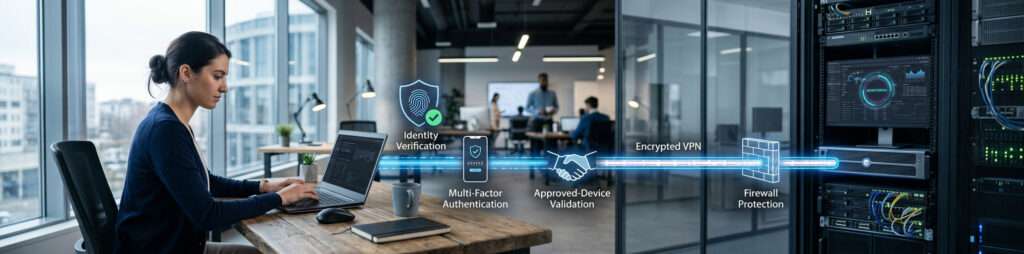
A business VPN creates an encrypted connection between a remote device and a VPN gateway. This can protect traffic from being read while it travels across untrusted networks and can allow the remote device to reach approved internal resources.
However, a VPN alone does not answer several important questions:
- Who is using the account?
- Was the password stolen?
- Is the connecting device approved?
- Is the device updated and protected?
- Which internal systems should the user be able to reach?
- Is unusual access being recorded and reviewed?
- What happens when an employee leaves?
- Who responds when a connection fails or suspicious activity appears?
If an attacker obtains valid VPN credentials, the encrypted connection may protect the attacker’s traffic just as it would protect an employee’s traffic. If a remote laptop is infected, the VPN may also create a path between that device and internal systems unless other controls limit the connection.
VPN technology can be an important component, but secure remote access for business requires multiple layers of protection around it.
1. Identify Which Resources Need Remote Access
Remote access design should begin with business requirements rather than a particular product.
Create an inventory of the resources employees may need outside the office. For each resource, document:
- Where it is hosted
- Who owns or manages it
- Which employees or roles require access
- Whether third-party vendors need access
- What type of information it contains
- How critical it is to business operations
- Which devices may connect
- What should happen if access becomes unavailable
Not every employee needs access to every system. A staff member who only needs email and cloud documents should not automatically receive network-level access to servers, administrative interfaces, cameras, or other internal resources.
Defining the required access first helps the business choose an appropriate connection method and prevents excessive permissions from becoming the default.
2. Give Every User a Unique Identity
Shared remote-access accounts make it difficult to know who connected, what they accessed, or whose permissions should be removed.
Each employee, contractor, administrator, and vendor should use an individual account. The identity system should support:
- Unique usernames
- Strong authentication
- Role-based permissions
- Account expiration where appropriate
- Centralized disabling of access
- Login and activity records
- Separate administrative privileges
Administrative work should not normally be performed through the same account used for email and everyday applications. Separating standard and privileged access reduces the consequences of one account being compromised.
Vendor accounts should also be identifiable and limited to the systems and time periods required for their work.
3. Require Multi-Factor Authentication
Passwords can be stolen through phishing, malware, data breaches, password reuse, or social engineering. Multi-factor authentication adds another identity check before remote access is granted.
CISA recommends requiring MFA for important systems, including remote access, because a password alone may not be sufficient to prevent unauthorized entry. Where supported and appropriate, phishing-resistant methods provide stronger protection than verification methods that can be easily intercepted or socially engineered.
MFA is still only one layer. It does not replace secure device configuration, access control, monitoring, encryption, or employee offboarding.
For a more focused explanation of this control, review why organizations need two-factor authentication.
4. Limit Access to Approved and Protected Devices

A legitimate employee can still create risk when connecting from an unmanaged, outdated, shared, or infected device.
Businesses should decide whether remote access is allowed from:
- Company-owned computers
- Personally owned computers
- Mobile devices
- Shared family devices
- Contractor or vendor devices
- Temporary replacement devices
Where possible, sensitive systems should be accessed from devices that the business can manage and support.
A help desk and IT support team can keep those devices updated and secured.
An approved device may be required to have:
- A supported operating system
- Current security updates
- Endpoint protection
- Device encryption
- Screen-lock requirements
- Secure configuration
- A functioning firewall
- An approved remote-access application
- The ability to be remotely locked or removed from service
Bring-your-own-device access requires a defined policy. The organization should understand which business data may be stored on the device, whether that data can be separated from personal information, and what happens when the device is lost or the employee leaves.
NIST’s guidance on enterprise telework and remote-access security recommends considering the security of every component, including organization-issued and personally owned client devices.
5. Apply Least-Privilege Access Control
Remote users should only be able to reach the applications, files, and systems required for their responsibilities.
Least-privilege access may involve:
- Assigning permissions by job role
- Separating users from administrators
- Limiting access to particular servers or applications
- Restricting vendor access
- Setting time-based access windows
- Requiring additional approval for sensitive systems
- Removing permissions that are no longer required
- Reviewing access periodically
Network segmentation can help prevent a remote connection from becoming unrestricted access to the entire office environment.
For example, a user who needs access to one business application may not need connectivity to employee devices, network-management interfaces, security cameras, printers, or server administration tools.
A properly designed Network Infrastructure Services environment can combine remote connectivity with firewalls, segmentation, routing, secure configuration, and controlled access between required systems.
6. Encrypt Data During Remote Connections
Remote-access traffic may travel across home networks, hotel Wi-Fi, public connections, mobile networks, and other infrastructure the business does not control.
Encryption helps protect information while it moves between the remote device and the approved destination. Depending on the environment, this may involve:
- Business VPN connections
- Encrypted web applications
- Secure remote-desktop gateways
- Encrypted file-transfer methods
- Protected cloud application sessions
- Device and storage encryption
Employees should avoid using unapproved remote-control software, sending business files through personal accounts, or transferring sensitive information through unsecured services.
Encryption protects data in transit, but it does not determine whether the user should have access. It must work alongside identity verification, device security, permissions, and monitoring.
7. Choose the Appropriate Remote-Access Method
There is no single remote-access technology that fits every business.
Business VPN
A VPN can provide encrypted connectivity to internal resources. It may be appropriate when users need controlled access to systems hosted inside the office.
The VPN gateway must be securely configured, updated, monitored, and protected with MFA. User permissions should still be limited after the connection is established.
Secure Remote Desktop
Remote desktop allows an employee to control an office workstation or hosted desktop from another location.
Remote desktop services should not be exposed directly to the public internet without appropriate protection. Access may require a secure gateway, MFA, restricted source access, monitoring, and account controls.
Cloud Application Access
Businesses using Microsoft 365, Google Workspace, cloud storage, or other hosted platforms may allow employees to connect directly to those services.
Security then depends heavily on the cloud identity configuration, MFA, device controls, session policies, access reviews, and monitoring rather than a traditional connection to the office network.
Zero-Trust or Application-Specific Access
Some environments provide access to individual applications based on user identity, device condition, location, risk, and policy instead of granting broad network access.
The central principle is that a successful connection should not automatically create trust for every other resource. Access decisions should reflect the user, device, requested system, and business need.
8. Protect the Internal Network Behind Remote Access
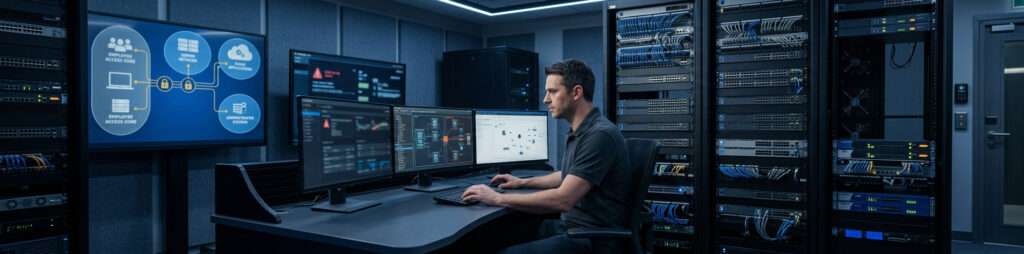
A secure remote-access gateway cannot compensate for a poorly organized internal network.
The business should also review:
- Firewall configuration
- Network segmentation
- Server and application exposure
- Wireless-network separation
- Administrative interfaces
- Unsupported equipment
- Patch and firmware management
- Backup and recovery systems
- Documentation
- Internet failover requirements
Remote users should enter an environment where internal systems are separated and permissions are controlled. Otherwise, one compromised account or device may provide more access than the business intended.
Remote access should therefore be designed as part of the wider network architecture, not treated as an isolated application.
9. Log and Monitor Remote Activity
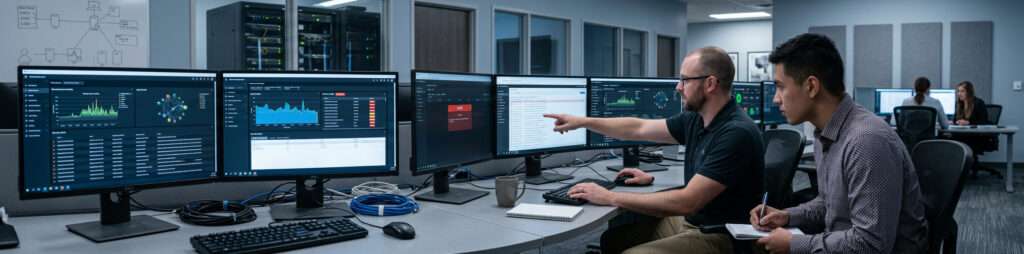
A secure connection should create enough information for the business to investigate unusual activity and troubleshoot access problems.
Useful records may include:
- Successful and failed login attempts
- User identities
- Device information
- Connection times
- Source locations or addresses
- Systems accessed
- Administrative changes
- MFA events
- Disabled or expired accounts
- Repeated authentication failures
Logging alone does not provide protection if no one reviews the records or receives alerts.
Monitoring should identify activity such as:
- Repeated failed logins
- Access from unexpected locations
- Connections at unusual times
- Multiple simultaneous sessions
- Disabled users attempting to connect
- Unusual administrative activity
- Unexpected device changes
- Significant increases in remote traffic
The appropriate level of logging depends on the systems, risks, regulatory requirements, and technical environment. Sensitive logs should also be protected against unauthorized access and alteration.
10. Create a Clear Onboarding and Offboarding Process
Remote access must follow the employee lifecycle.
When a user joins or changes roles, the business should define:
- Which systems the user needs
- Which permissions are appropriate
- Which device will be used
- Who approves the access
- How MFA will be enrolled
- What training or instructions are required
- Who provides support
When an employee, contractor, or vendor leaves, access should be removed promptly. Offboarding may include the following steps (see our full offboarding checklist)
- Disabling the account
- Ending active sessions
- Revoking remote-access permissions
- Removing registered devices
- Revoking authentication tokens
- Recovering company equipment
- Changing shared credentials that cannot be eliminated immediately
- Reviewing recent activity
- Transferring ownership of files or systems
Waiting to remove access until someone notices unusual activity creates an unnecessary risk. The business should know in advance who is responsible for initiating and completing the process.
11. Provide Employees With Safe Remote-Work Instructions
Technology controls are more effective when employees understand how to use them.
Remote users should know:
- Which devices are approved
- Which connection method to use
- How to verify they are using the legitimate login page
- How to respond to unexpected MFA requests
- Whether public Wi-Fi is permitted
- Where business files may be saved
- Which applications are approved
- How to report a lost device
- How to request technical support
- What to do when remote access fails
Employees should never approve an unexpected authentication request simply to make a notification disappear. Repeated MFA prompts may indicate that someone is attempting to use stolen credentials.
Users should also avoid installing unapproved remote-access tools or asking colleagues to share accounts as a workaround.
12. Plan for Remote-Access Failures and Support
Secure access must also be reliable enough for employees to work.
A support plan should answer:
- Who helps users when the connection fails?
- How is the user’s identity verified during support?
- Can support be provided without sharing passwords?
- Who coordinates with the internet or software provider?
- What happens if the VPN gateway or firewall fails?
- Are configuration backups available?
- Is an alternative connection method approved?
- How are urgent access requests escalated?
- How are support changes documented?
Support teams should distinguish between a remote employee’s local internet problem, an identity issue, a device problem, a cloud-service outage, and a failure inside the company network.
Temporary workarounds should not quietly become permanent access methods without review.
Common Secure Remote Access Mistakes
Remote-access risk often grows through small, convenient decisions rather than one major technical failure.
Common mistakes include:
- Treating a VPN as the complete security strategy
- Allowing shared accounts
- Relying only on passwords
- Granting broad network access by default
- Allowing unmanaged devices without a policy
- Exposing remote desktop directly to the internet
- Failing to update VPN or firewall equipment
- Leaving former employee or vendor accounts active
- Not reviewing remote-access logs
- Allowing unauthorized remote-control software
- Storing business data on personal devices without controls
- Providing access without documentation or support ownership
A secure remote-access design should reduce these weaknesses before employees depend on the system for daily work.
Secure Remote Access for Business Implementation Checklist
Before launching or expanding remote access, confirm that the business has addressed the following:
- Required users and systems have been identified.
- Every user has a unique account.
- MFA is required for remote access.
- Approved-device requirements are documented.
- Access follows job responsibilities and least privilege.
- Remote connections use appropriate encryption.
- Internal networks and sensitive systems are segmented.
- Firewalls, gateways, and access tools are supported and updated.
- Login and administrative activity are recorded.
- Important alerts have a responsible owner.
- Employee onboarding and offboarding are documented.
- Vendor access is limited and reviewed.
- Employees know how to report suspicious activity.
- Support and escalation procedures are defined.
- Remote-access configurations and dependencies are documented.
- The system is tested before becoming operationally critical.
When to Request a Professional Remote-Access Assessment
Professional assessment may be appropriate when:
- Employees need access to internal servers or specialized applications
- Remote desktop is exposed to the internet
- The business does not know which remote-access tools are active
- Shared or unmanaged accounts are being used
- Personally owned devices connect to sensitive systems
- Remote access is unreliable
- The network lacks segmentation
- MFA is not consistently enforced
- Vendor access is not documented
- Former users may still have access
- Logs are collected but not reviewed
- The business handles sensitive customer, financial, legal, or healthcare information
A remote-access assessment should evaluate the complete path between the user and the business resource. This may include identity systems, devices, authentication, internet connectivity, firewalls, VPNs, remote-desktop gateways, cloud platforms, permissions, encryption, logging, documentation, and support responsibilities.
How Cybersecurity Supports Secure Remote Access
Remote access expands the places, devices, and networks from which business systems may be reached. Cybersecurity controls help reduce the risk created by that expanded access.
These controls may include:
- Identity protection
- MFA
- Endpoint security
- Access policies
- Threat monitoring
- Security alerts
- Vulnerability management
- Account reviews
- Incident response
- Employee security awareness
Techbleed’s Cybersecurity Services in Glendale help businesses coordinate security across users, devices, cloud services, and network access. These protections complement the network infrastructure used to provide connectivity.
Why Secure Remote Access Requires Ongoing Management
Remote access is not a one-time installation.
Employees join, leave, and change roles. Devices are replaced. Applications move to the cloud. Vendors require temporary access. Security updates are released. Business operations expand, and new risks appear.
Ongoing management may include:
- Adding and removing users
- Reviewing permissions
- Monitoring access events
- Updating devices and gateways
- Investigating alerts
- Maintaining documentation
- Supporting employees
- Coordinating vendors
- Reviewing capacity and reliability
- Testing access and recovery procedures
- Improving policies as the business changes
A structured Managed IT Services in Glendale relationship can provide ongoing responsibility for these operational tasks while coordinating network performance, device management, security, user support, and long-term technology planning.
Build Secure Remote Access for Business Around More Than a VPN
Secure remote access for business should make required systems available without giving every user, device, or connection unnecessary trust.
A VPN may be part of the solution, but the complete design must also address identity, MFA, devices, permissions, encryption, segmentation, monitoring, employee processes, documentation, and support.
The right solution depends on the business’s applications, infrastructure, users, locations, data, and operational requirements.
Techbleed helps businesses in Glendale and the greater Los Angeles area evaluate remote-access requirements, identify security and infrastructure gaps, and design a controlled approach for connecting employees and approved devices.
Frequently Asked Questions
What is secure remote access for business?
Secure remote access allows authorized users and approved devices to connect to business applications, files, servers, or networks from outside the office. It combines an appropriate connection method with identity verification, MFA, device controls, limited permissions, encryption, logging, and support.
Is a VPN enough to secure remote employees?
No. A VPN can encrypt traffic and provide connectivity, but it does not automatically confirm that the user is legitimate, the device is protected, or the account has appropriate permissions. MFA, device security, access control, monitoring, updates, and documented processes are also required.
Should employees use personal devices for remote access?
That depends on the company’s systems, data, risk, and device-management capabilities. If personal devices are permitted, the business should establish security, update, encryption, data-storage, access-removal, and support requirements.
Why is MFA important for remote access?
Remote access can be targeted using stolen or reused passwords. MFA requires an additional identity check, making it more difficult to access the account with the password alone. MFA should be combined with other security controls.
What is the difference between VPN and zero-trust access?
A VPN commonly creates an encrypted connection to a network or network segment. A zero-trust approach evaluates access based on factors such as user identity, device condition, requested application, location, and policy, and does not automatically trust a connection after it is established.
How should vendor remote access be managed?
Vendors should receive unique, limited, and documented accounts. Access should be restricted to required systems and time periods, monitored where appropriate, and removed when the work or agreement ends.
What remote-access activity should a business monitor?
Businesses may monitor successful and failed logins, unusual locations or times, new devices, repeated MFA failures, administrative changes, disabled-account attempts, concurrent sessions, and access to sensitive systems.
When should remote access be reviewed?
Remote access should be reviewed when employees join, leave, or change roles; when devices or applications change; after security incidents; when vendors complete work; and periodically to confirm that accounts and permissions remain necessary.
Headquarters
Contact
Phone number